Beetv Official 2027
BeeTV APK is a movie and video streaming app that brings the latest & free streaming content from global entertainment brands like Netflix, Prime Videos, Hotstar, Disney+, and others.
Version: v4.7.10 Size: 16 MB
Beetv
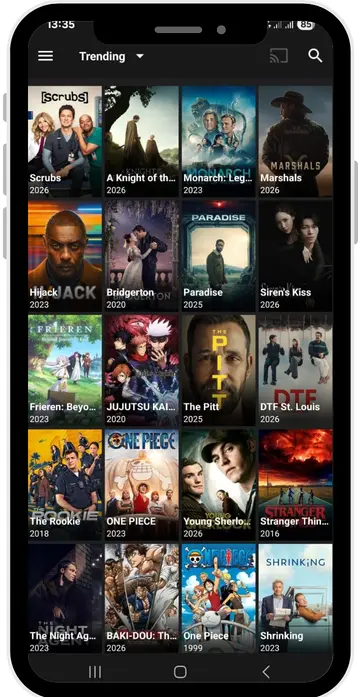
Bee TV is a highly favored streaming app that enables users to stream movies and TV series from various online sources. Built with a neat and user-friendly interface, Bee TV is an ideal platform for searching the latest, classics and trending TV series. It is light, fast, and works on most Android devices including phones, tablets, Android TV boxes, and Fire TV devices.
In addition to this, it can be used with external media players for a better viewing experience using a preferred video player. Through updates, developers of the app have been able to make improvements in the performance of the app. They have fixed all the issues that may arise from the app. Features like subtitles support, HD streaming links, and a nicely organized content library have enabled Bee TV to gain popularity among the users.
What is Bee TV APK?
The Bee TV APK is designed for Android devices that allows installing the streaming apps without having to download it via the app store. The main idea behind the app is the ability to discover different movies and TV series by collecting the links to their streams on the Internet. The app features a user-friendly interface, with the categories arranged in a convenient way and a powerful search tool available.
It is lightweight and installs rather quickly. Besides Android devices, it can be used on Android TV, TV boxes and even Fire TV devices. Also, the integration with external media players is supported. Updates are released regularly, providing extra stability and compatibility with new types of videos. The APK format of the app requires downloading it only from reliable resources.
Features of Bee TV APK
Large Collection of Content
Users will get access to a large collection of movies, TV shows, animations, and others through BeeTV APK app. They can watch anything starting from classic films up to the latest movies using this user-friendly app.
Many Streaming Sites
For each movie and show, the app will search for multiple sites that will provide streaming for it. Users will have an option to select any link that suits them depending on their internet connection and quality preferences.
Automated Link Searching
In contrast to providing streaming videos itself, this app searches streaming sources from various sources. Not only it increases the probability of having working links but also gives the alternative links in case of failing any of them.
Compatibility with Other Media Players
This app is compatible with famous media players including VLC and MX players. This gives the advantage of controlling video playback along with subtitle support.
Availability of Subtitles
There are subtitles available in different languages on the platform for its users. It will become easy for the viewer to download, synchronize and use subtitles in different languages. Hence being able to watch movies in different languages.
Personal Favorite List
Using this app, the users will be able to create their personal favorite movies and TV series list. In doing so, the viewers will be able to access movies that viewers like without having to spend much time searching for them.
Effective Search Engine
An effective search engine will provide immediate results on all movies, TV series, actors and episodes that the viewer is looking for. Thus, there is no need for users searching for movies for a long time or losing movies that remain unwatched.
Different Genres
Movies and TV series will be categorized according to various genres. This includes action, comedy, thriller, romance, horror, family, sci-fi and documentaries. Each type of content is well organized into their suitable category and thus it makes the search for the particular movies easy for the users.
Recommendations for Trending Content
Recommendations for the newest movies and the most watched TV shows are among standard features provided by the app. This enables users to discover new popular movies and web series. All the users stay informed about new and fresh content on the platform for the users.
Regular Content Updates
The large library of the app is regularly updated. Users can get access to various streaming sources and new movies and TV shows. They get all the new and fresh released movies and web sites for the users. Hence, there is no need to move to any other platform for new movies.
Lightweight App
The size of the app is very small in comparison with other streaming apps. This feature helps the app run well on budget Android phones. It also improves the efficiency of the app and reduces loading time of the content on this app.
Efficient User Interface
The user interface of the app is quick and easy. It is fast and convenient for the new users of the app. Also, it reduces the time of loading and browsing content more efficiently.
Optimized App
The app is optimized for Android TV usage. The interface is optimized for the big screen and is comfortable to operate via remote control. It is easy and simple to use for the users. New users find it easy and fast while pro users find it one of the best apps among other streaming apps.
Variety of Streaming Servers
Some movies and TV shows on this APK app have access to multiple streaming servers. Users can change these links during playback, which can help fix any problems. If one link is down due to any issue users can switch to any other server to continue their watching.
Ad-Free Streaming
The app offers an ad free streaming environment to the users. Users can also use external players to remove ads from the app. This creates an uninterrupted experience while watching with family or children.
How to Download and Install the BeeTV APK App on Android?
Downloading and installing the app becomes a very easy task if done using an Android phone. This is due to the fact that APKs cannot be downloaded from the Google Play store. This means that users will have to undertake some modding in order to download the APK from third party sources other than the Play Store. It is important that the APK file should be downloaded from a credible source.
- You must have a stable internet connection for this.
- Download the file from a reliable source.
- Allow your settings to go with unknown sources.
- When it is complete, locate the file and open it.
- Allow all the basic permissions.
- Your APK file is ready to serve you its best services.
Is BeeTV APK safe to use?
BeeTV APK is 100% safe to use when downloaded from a trusted source, as it isn’t available on the official app store and APKs from third-party websites may be modified and encumbered with ads, trackers, or malware. The safety of a specific BeeTV APK depends on its source and if it has been modified. Prior to installation, users should scan the APK with reliable security software, and check the source. They should also check the permissions and decision versions with unnecessary sensitive data permissions.
How to Use Bee TV APK App?
The APK streaming app is quite easy to understand and use. First of all, one needs to install an APK app on the Android phone. After installing the APK app, all you have to do is simply open it and give it all the permissions. You will be given two options here, one being going through various categories like movies, TV series, or recent categories, while the other being searching for a particular TV show. For this, all you have to do is simply click on the ‘stream’ button for a particular TV show.
Content to Watch on BeeTV APK
Latest Movies
This streaming app provides its users with the latest movies for the users. Users can now watch free and unlimited free movies and other content. Regular updates of the content provides more refreshment to the users. This feature is very helpful and gives you fresh content.
Popular TV Shows
There are millions of free TV shows and other content for the users to watch. Users can easily watch any episode of their favorite TV drama or show. The continue watching option helps track progress without any problem. It is a good feature for the users who enjoy binge watching.
Web Series
Amazing web series with unique plots created by authors from all over the world are presented in this APK app. Subtitles make the content independent from the language. People may discover a variety of stories that are told by authors from all over the world. The category is ideal for the young audience.
Anime Collection
Subtitled and dubbed anime is provided in the anime collection. The anime collection is a place for anime lovers and fans.
Documentaries
The documentaries cover all spheres such as history, science, nature, and culture. All documentaries have subtitles which make them available for the international audience. They combine entertainment and education.
Kids’ Content
There is a special kids’ category with cartoons and movies in Bee TV application. The children will be able to watch their favorite cartoons and movies daily. It is ideal for the parents and their children.
Regional Movies
People may watch movies in Hindi, Spanish, Korean, and many other languages on Bee TV. Subtitles will help to understand the films better. It is a very diverse feature of the app.
Pros and Cons
| Pros | Cons |
| The APK app contains a large amount of movies and other content for the users. | Play back quality of the content depends on strong internet connection. |
| It is light weight, thus fast and convenient for the users. | Some versions may show ads to the users. |
| The performance of the app is improved in the latest update of the app. | All APK apps are unofficial and not present on Google Play Store. |
| The user interface of the app is simple to use for the users. | |
| It supports many external media players for the users. |
Why Choose BeeTV?
This would be the ideal choice for those users who are looking for an easy yet diversified way of watching their favorite movies and TV shows. As the app comes with a friendly interface, you can easily explore the website using the app. There are various categories of movies and TV shows that are available in the app, and these include action, comedy, dramas and others. This is a small app and hence can easily be downloaded in your various Android mobile devices. You can make use of third party apps like VLC and MX Player for playing videos from the website.
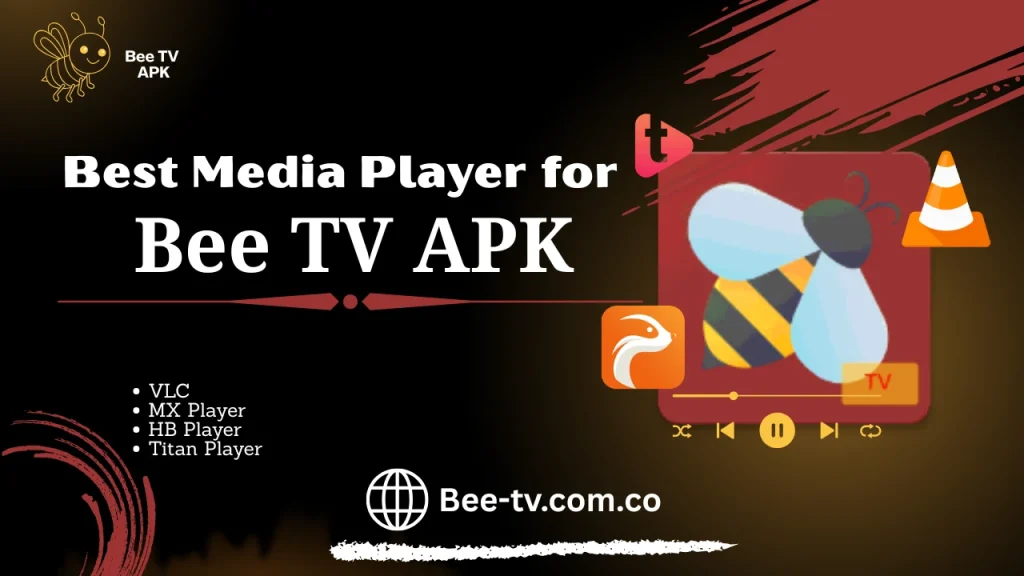
Best Media Player for BeeTV
It is possible for the user to use an external media player as this app is capable of working with many media players. There are thousands of media players that can be used in android phones. However, we must be considering some of the best media players.
- VLC
- MX Player
- HB Player
- Titan Player
Also to these external media players, users can go with any other video player and media player they want.
How to Sideload BeeTV on Firestick?
The installation of the app is impossible through the normal procedure. Because the app is not available on the Amazon App store. Start by going to Settings search My Fire TV then Developer Options and turn the option “Install apps from unknown sources” ON. Second, install an app which can download apps that are available in the Amazon App store since you do not have it installed on your Firestick device. You should then proceed and open the app and input the URL link of BeeTV APK, and start the downloading process. Finally, hit the Install button and wait for the whole process to end.
Bee TV Alternatives
CyberFlix TV
CyberFlix has a large selection of movies. Users can choose the quality in which the movies stream because CyberFlix provides multiple links. Subtitles in various languages support global audiences. The app refreshes its library with every update. CyberFlix makes every step of the streaming process easy.
Cinema HD
Cinema HD also has dependable video sources. It has classics, and new releases too. Real-Debrid supported users can have quick and smooth streaming. The interface is custom, and simple enough to be easy to use. Trust Cinema HD for daily, nonstop entertainment.
Nova TV
Nova TV is an alternative app to BeeTV. It has a large catalog of movies and shows. It also provides fast links and optimized functionality for external players. All app features are available in subtitles for international audiences. Nova TV also updates frequently to bring fresh offerings to users. Nova TV is a great streaming app for daily use.
Tea TV
Tea TV is available on numerous platforms and all sizes of mobile devices. Its quality is the same on all platforms. You can download videos for offline use. If you prefer reading over watching, subtitles help people understand video when they cannot hear the audio. It is useful for all types of viewers.
Stremio
Stremio is a media hub for centralized entertainment. Add-ons assist in streaming content including films, series, and even YouTube. Videos can also be casted to televisions without a hassle. This app saves user preferences per login, and even allows for cross device syncing. Stremio is an inventive new way to begin your daily streaming.
ZiniTevi
ZiniTevi is a performance-centric app, a pliant BeeTV Alternative with HD Streams and Subtitle support. The app performs well with casting devices and external players. Users can make watchlists and favorite collections. Features can even adapt to easy use for the beginner or expert streamer.
BeeTV App Common Issues & Fixes
BeeTV App crashing on Launch
If BeeTV keeps crashing, go into your phone settings. Then go to your Apps, select BeeTV, and clear the Cache first. If that doesn’t fix the issue, clear App data and try again. Otherwise, uninstall BeeTV and download the newest version on their official website. The most common solution to App issues is a reinstall.
Subtitles are missing
In the player, select the subtitles icon and tap Search Online. If no results appear, go back and select a different source link since some links have subtitles while others do not. If the app is stuck on Please Wait, exit the app completely. If the problem persists, clear the app’s cache. Almost all of these issues are resolved with a Real-Debrid account.
No links issue
All sources you’ve searched for that title may are down. Please try again after 10-15 minutes. If you need it sooner, try searching for a different version or try HDRip if no links are showing for 4K. This error is solved completely in almost all cases when you connect to Real-Debrid.
Is BeeTV APK safe to use?
BeeTV APK is 100% safe to use when downloaded from a trusted source, as it isn’t available on the official app store and APKs from third-party websites may be modified and encumbered with ads, trackers, or malware. The safety of a specific BeeTV APK depends on its source and if it has been modified. Prior to installation, users should scan the APK with reliable security software, and check the source. They should also check the permissions and decision versions with unnecessary sensitive data permissions.
Things to note before installing BeeTV APK:
- Download source: Only download from official and reputable sites. Avoid mirrors and unknown sites.
- APK integrity: Poor repackaging on a modified APK could contain malware.
- Permissions: Consider the name of the app and the suspicious permission requests before installing.
- Security scanning: Run a security scan on the APK before installing.
- Updates: Some older APKs have security risks that haven’t been fixed.
- Privacy: Analyze what the app can collect. Is it device info? Usage info? Even personal info?
- Advertisements: Take caution if the app has pop up ads or ads that are excessive and discouraging.
- Device protection: Always keep both Android and Google Play Protect active.
- Content Sources: BeeTV can access a third party streaming source and could be legally and unreliable in your region.
Older Versions Of Bee TV APK
v4.5.6
What this version provides to the Bee TV users:
- Faster links; quicker loading sources
- New live sports channels in Live TV
- Subtitle sync issues for some languages fixed
- 4K stream chromecasting issues fixed
- Performance changes on Android 14
- Continue Watching row bug resolved
- Over 200 new anime
- Real-Debrid connections are faster
v4.5.5
What this version provides to the Bee TV users:
- Introduced Low Data Usage Mode
- Upgraded Parental control PIN system
- Added genre filters for Anime, Documentary, and Stand-up Comedy
- Fixed External Player Handoff – No black screen on launch
- Trakt sync speed is 2x faster
v4.5.4
What this version provides to the Bee TV users:
- Introduced a cloud backup for saving user preferences
- Implemented a multiple user profiles feature
- Improved auto play of the subsequent episode
- Fixed crashes for Android 13 devices with 2 GB of RAM
- Now search supports queries for actors and directors
Benefits of using older versions of Bee TV APK
The old version of BeeTV can be helpful for your system if your device does not support the new version. It can have a user-friendly interface and requires fewer system resources.
- Better compatibility: Older versions may be compatible with more older Android devices.
- Lower resource usage: Older releases may use less RAM and CPU.
- More familiar interface: Users who prefer an older design may find it easier to navigate.
- Less frequent changes: Older versions may be better if a newer update changes the interface or the behavior significantly.
- Better performance on older hardware: A lightweight older release may run better on older computing devices.
- Avoid changes: Users may prefer an older edition before some of the features and design changes were made.
- APK file size: Some older releases may have a lower APK file size.
FAQ’s
Conclusion
In terms of Android apps, the Bee TV has become popular owing to its capability to consolidate the streaming sources for movies and television series. From the perspective of user experience, particularly for the ones who want instant access to different entertainment sources, the app does provide a large number of choices, and its easy interface fits well on various Android gadgets. In case of old gadgets, the older versions of Bee TV application can be utilized. Moreover, people who appreciate the older version of the application can also utilize it.
Users need to ensure that they can properly examine the source of the APK, use security software to scan for any downloads made, examine any permission downloads, and make sure that their Android phones have the proper updates for any security vulnerabilities. The next thing that should be taken into consideration is the legality of all the content that can be provided by these third-party applications and respect any laws that may be applicable in your jurisdiction. Bee TV provides some very simple entertainment features but one should go beyond those.